 PHP HTML Editor
JavaScript rich text editor or PHP HTML editor: what your server has to do
A browser editor edits text. Files, folders and permissions still need a server. Here is the list.
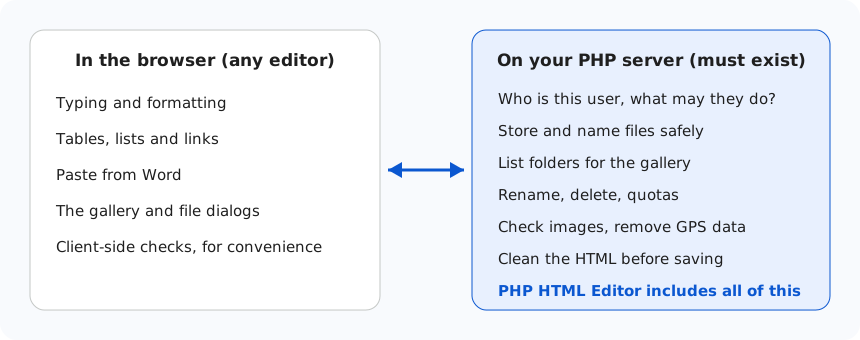
Most rich text editors today are JavaScript. They are excellent at what happens in the browser. But when you add one to a PHP site, you find that a large part of the job was never in the browser. This guide lists what your server still has to do, so you can decide with your eyes open.
What a JavaScript editor does
Typing, formatting, tables, pasting from Word, undo: all of it runs in the page, and all of it is good in the leading products. When the user inserts a picture, however, the editor sends the file to an address you give it, and waits for your server to answer. Whatever happens next is yours.
What your PHP server has to do
Here is the list for a site where users can add pictures and files:
| Job | If you write it yourself |
|---|---|
| Receive an upload | An endpoint with a token check, so that another site cannot use it |
| Check the file | Allowed types, the real content, the size, and a safe name |
| Process the photo | Turn it upright, resize it, remove GPS and camera data |
| Image gallery | An endpoint that lists folders and images, plus creating folders |
| File manager | List, rename, delete, each with path checks and permissions |
| Permissions | Guest, member and admin rules, applied to every operation |
| Quotas | Track the folder size and refuse when it is full |
| Clean the HTML | A real parser and an allowlist, before you save |
Each row is a small project, and each one can become a security hole if a case is missed. An upload endpoint with a forgotten check is among the most serious bugs a website can have. It also keeps costing you, since you own that code for as long as the site runs.
What a PHP HTML editor changes
PHP HTML Editor is the JavaScript RichTextEditor in the browser, plus a PHP package that does all of the above. You copy one folder and write a few lines:
<?php
require_once __DIR__ . '/richtexteditor/phphtmleditor/autoload.php';

$editor = new PhpHtmlEditor\Editor('Article');
$editor->policyFile = $isAdmin ? 'admin.config' : 'default.config';
$editor->handleRequest();   // uploads, gallery and files are answered here
?>
The browser side is the same editor: the same toolbar, Word paste, tables, track changes, accessibility checker and exports. What you add is the part you would otherwise have had to write and maintain.
When a JavaScript-only editor is the right choice
It is not always worth having a server package. A JavaScript editor alone is a good fit when:
- your back end is not PHP, or the files go to a cloud storage service with its own upload path,
- you already have a media library, permissions and an HTML cleaner,
- users never upload anything, such as an internal notes field.
We make a JavaScript edition too, so this is honest advice rather than a sales line.
A PHP package is the better choice when
- your site runs on PHP and you want pictures and files on your own server,
- people with different roles upload to the same site,
- you do not have time to own a file-handling back end and its security,
- your hosting is ordinary: no Node, no Composer requirement and no extra database are needed.
Check before you decide
Whichever you choose, ask the same questions. What happens if a user uploads a script renamed .jpg? Can a guest list your folders? Who removes GPS data from photos? Who cleans the HTML on the server? You can test our answers in the live demos, where each role has its own view, or read the upload checks in detail.