 PHP HTML Editor
Secure file upload in PHP: the checks that matter, in plain English
What can go wrong when a site accepts files, and the check that stops each problem.
A form that accepts files is the most dangerous form on a website. If someone uploads a PHP script and can then open it in a browser, they can run code on your server. Most of the risk comes from a handful of well-known tricks. Here they are in plain English, each with its check. All of these checks run on the server, because anything in the browser can be bypassed.
"I'll upload a script"
The trick: upload shell.php, then visit it.
The check: keep a list of what is allowed instead of what is forbidden, and refuse active types regardless. PHP HTML Editor accepts only the extensions in the policy, and never stores PHP, ASP, HTML, SVG, JavaScript, server configuration files or similar types, even if someone adds them to a policy by mistake.
"I'll disguise it as an image"
The trick: name the script photo.jpg, and tell the browser to call it image/jpeg. The name and the type in the request are both written by the sender, so neither proves anything.
The check: read the bytes. An image that is not really an image is refused. Real images are then decoded and saved again, which keeps the picture and drops anything hidden in the file. The stored file gets the extension of its real type, so a PNG named .jpg is stored as .png.
GIF is the exception, because saving it again would lose its animation. So a GIF is kept as it is, unless it contains signs of server code or a script tag, in which case it is refused.
"I'll send a huge picture"
The trick: a small file can decode to an enormous bitmap and exhaust the server's memory.
The check: read the dimensions from the header, before decoding anything. The default limit is 40 million pixels. Below that, if PHP's memory_limit is too low for the picture, it is raised for that request if PHP allows it, and otherwise the user is told the image is too large. They get a message instead of a blank error.
"I'll fill your disk"
The check: a limit per file and a quota for the whole storage, both in the policy. Guests cannot upload at all in the included policies.
"I'll write outside the folder"
The trick: a file or folder name such as ../../index.php.
The check: every path is resolved inside the storage folder. .. segments are refused, symbolic links are not followed, and names are checked against a pattern and against Windows device names such as CON.
"I'll make your admin do it"
The trick: a page on another site quietly sends a request to yours, from the browser of someone who is logged in. It is called cross-site request forgery.
The check: every upload, gallery and file request must carry a token stored in that visitor's session. The other site cannot read it, so its request is refused.
All together
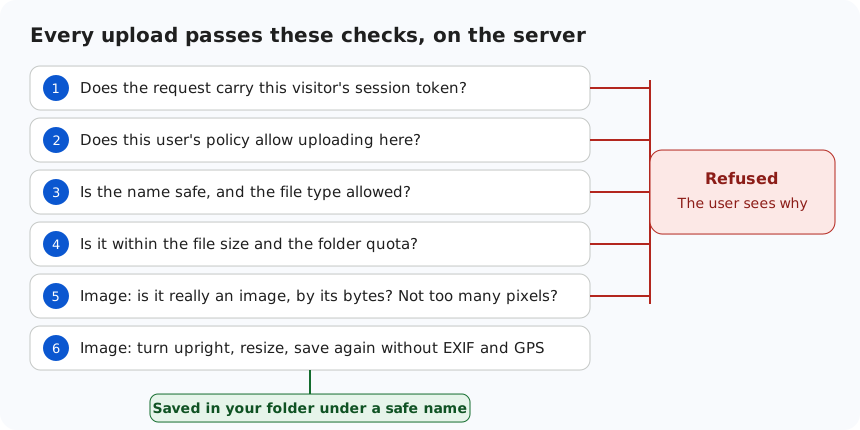
This is the order each upload goes through. Any "no" ends it, and the user sees the reason:
One more lock on the door
Good practice is to have two independent protections. So configure the upload folder so that the web server would not run a script from it, even if one ever got there. On IIS, put this in uploads/web.config:
<configuration>
  <system.webServer>
    <security>
      <requestFiltering>
        <fileExtensions allowUnlisted="true">
          <add fileExtension=".php" allowed="false" />
        </fileExtensions>
      </requestFiltering>
    </security>
  </system.webServer>
</configuration>
The deployment guide has the full version, plus Apache and nginx.
Keep your software current
No list makes any website permanently safe, and this one covers uploads, not your whole site. Keep PHP up to date, and update the editor when a new version comes out. If you find a problem, tell us.