 PHP HTML Editor
Add a WYSIWYG HTML editor to a PHP form and save it to MySQL
From an empty page to a working form: the editor, the cleaned HTML and a safe database query.
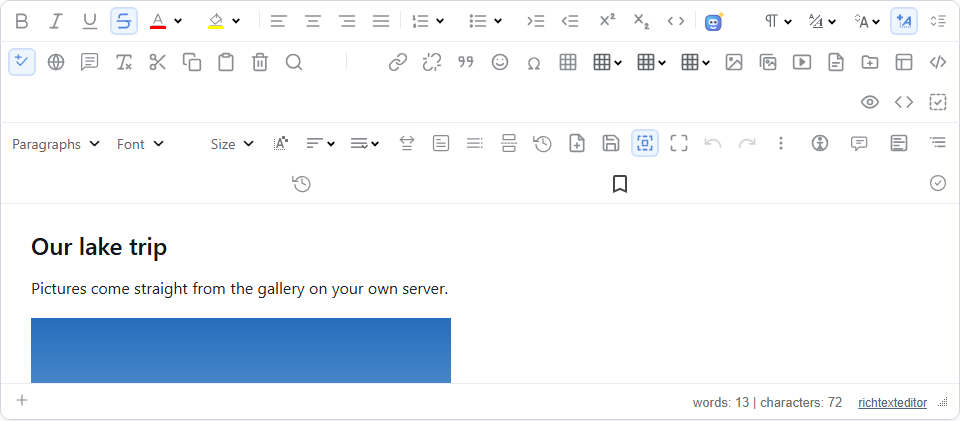
You have a PHP form with a plain text box, and you want people to be able to add headings, lists and pictures. This guide takes you from there to a working page that saves to MySQL and loads the content back for editing. There is no framework and no build step.
What you need
- PHP 8.0 or later, with the standard DOM extension, and GD for images,
- MySQL or MariaDB, with PHP's PDO driver,
- the PHP HTML Editor download; the trial has every feature.
Step 1: copy the folder
Unzip the download and copy richtexteditor to your web root. Make sure the web server can create and write the uploads folder beside it. That is the whole installation. The deployment guide has the exact commands for IIS, Apache and nginx.
Step 2: make the table
CREATE TABLE articles (
    id INT AUTO_INCREMENT PRIMARY KEY,
    title VARCHAR(200) NOT NULL,
    body MEDIUMTEXT NOT NULL
) CHARACTER SET utf8mb4;
Use MEDIUMTEXT, because TEXT stops at 64 KB and long documents reach that. Use utf8mb4 so that emoji and every language are stored correctly.
Step 3: the page
This is the complete edit.php. Put your own database name, user and password in the first lines:
<?php
require_once __DIR__ . '/richtexteditor/phphtmleditor/autoload.php';

$pdo = new PDO('mysql:host=localhost;dbname=mysite;charset=utf8mb4', 'db_user', 'db_password', [
    PDO::ATTR_ERRMODE => PDO::ERRMODE_EXCEPTION,
]);

$editor = new PhpHtmlEditor\Editor('body');
$editor->policyFile = 'default.config';
$editor->height = '420px';
$editor->handleRequest();   // uploads and the gallery; before any output

$id = (int) ($_GET['id'] ?? 0);

if ($_SERVER['REQUEST_METHOD'] === 'POST') {
    $title = (string) ($_POST['title'] ?? '');
    $body = $editor->posted();   // the HTML, cleaned on the server
    if ($id > 0) {
        $stmt = $pdo->prepare('UPDATE articles SET title = ?, body = ? WHERE id = ?');
        $stmt->execute([$title, $body, $id]);
    } else {
        $stmt = $pdo->prepare('INSERT INTO articles (title, body) VALUES (?, ?)');
        $stmt->execute([$title, $body]);
        $id = (int) $pdo->lastInsertId();
    }
    header('Location: edit.php?id=' . $id);
    exit;
}

$title = '';
if ($id > 0) {
    $stmt = $pdo->prepare('SELECT title, body FROM articles WHERE id = ?');
    $stmt->execute([$id]);
    if ($row = $stmt->fetch(PDO::FETCH_ASSOC)) {
        $title = $row['title'];
        $editor->html = $row['body'];
    }
}
?><!DOCTYPE html>
<html lang="en">
<head><meta charset="utf-8" /><title>Edit article</title></head>
<body>
<form method="post">
    <p><input name="title" value="<?php echo htmlspecialchars($title); ?>" placeholder="Title" /></p>
    <?php echo $editor->render(); ?>
    <p><button type="submit">Save</button></p>
</form>
</body>
</html>
Why it is written this way
handleRequest()comes first, because it answers the gallery and upload requests before the page writes anything.posted(), not$_POST['body'], gives you HTML that has been cleaned. Scripts never reach your database.- The
?placeholders stop SQL injection. Never build a query by joining strings. - The redirect after saving means that pressing Reload does not save twice.
Step 4: show it to readers
<?php
$stmt = $pdo->prepare('SELECT title, body FROM articles WHERE id = ?');
$stmt->execute([(int) ($_GET['id'] ?? 0)]);
$row = $stmt->fetch(PDO::FETCH_ASSOC);
if ($row) {
    echo '<h1>' . htmlspecialchars($row['title']) . '</h1>';
    echo $row['body'];   // the HTML was cleaned when it was saved
}
?>
The title is plain text, so it is escaped. The body is HTML that was cleaned when saved, so it is printed as it is.
Before you go live
Put your own login check at the top of edit.php, and choose the policy from the user's role. As it stands, anyone who can open the page may edit. The editor protects the files and the HTML; deciding who may open the page is your application's job.