 PHP HTML Editor
Remove EXIF and GPS data from uploaded photos in PHP
A phone photo can reveal where it was taken. How to clean it on upload and keep it the right way up.
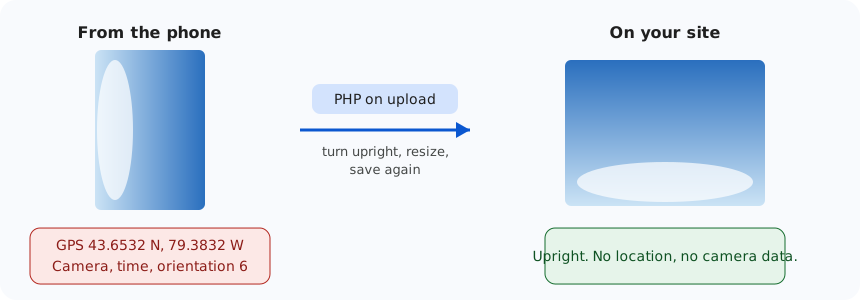
Take a photo with a phone and the file may record exactly where you stood, along with the time and the phone model. Upload it to a website unchanged, and anyone who downloads it can read all of that. A member who posts a picture of their new sofa may have just published their home address, without knowing.
What is in a photo
JPEG files carry a block of data called EXIF. It can include:
- GPS coordinates, if location was on for the camera,
- the date and time,
- the camera or phone model and its settings,
- the orientation: phones often store the picture sideways with a note saying "turn me".
That last item is why removing EXIF carelessly goes wrong. Delete the note without turning the picture, and portrait photos appear on their side.
What PHP HTML Editor does
By default, every JPEG, PNG, WebP and AVIF uploaded through the editor goes through the same steps, as the picture above shows:
- read the orientation note,
- decode the picture and turn it upright,
- resize it if it is larger than the policy allows,
- save it again as a new file.
Only the pixels survive saving again, so EXIF, GPS, XMP and ICC data are all gone. Nobody has to remember anything, and users do not have to know the risk exists.
It is one policy setting, on by default:
<security name="StripImageMetadata">true</security>
Photographers who need their camera data can have a policy with this set to false. Pictures are then kept as they are unless they also need turning, resizing or converting.
No exif extension needed
Many PHP guides use exif_read_data(), but that function only exists if the exif extension is enabled, and many servers do not have it. Our own server does not. A guide that relies on it silently stops turning photos when it is missing. So the package reads the orientation directly from the file, and only needs the GD extension, which processes the images.
Doing it yourself in plain PHP
If you only need the basic idea for your own script, decoding and saving with GD drops the metadata:
<?php
$bytes = file_get_contents($_FILES['photo']['tmp_name']);
$image = imagecreatefromstring($bytes);
if ($image !== false) {
    imagejpeg($image, __DIR__ . '/uploads/clean.jpg', 88);
}
?>
That removes the data, but this short version does not turn the picture, so phone photos may end up sideways. It also does not check the size before decoding, or the file's type and name. Those are the parts that take the time, and they are covered in the upload guide.
Check it yourself
Upload a phone photo with location turned on, download it again from your site, and open its properties. On Windows, look under Properties, then Details: the GPS section should be gone. We run this same test against our live demo with a test photo that contains a GPS marker.
What this does not cover
Pictures can reveal things in what they show, such as a street sign. And PDFs and Word files have their own properties, which are not changed, because documents are stored as uploaded. Removing EXIF solves the hidden-data problem for pictures only.