 PHP HTML Editor
Give each user their own upload folder in PHP
Keep one customer's pictures away from another's with a single line of code per folder.
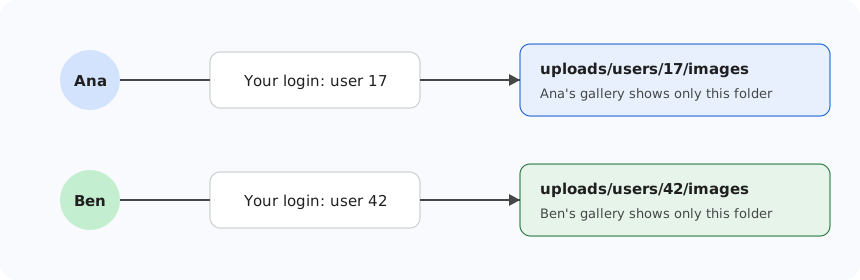
On a company site everyone can share one folder of pictures. On a forum, a marketplace or a multi-customer application they cannot: one customer must not see or pick another customer's pictures. The answer is a private folder for each user, and you do not have to write a file manager to get it.
The idea
Your login already knows who the user is. Before the page shows the editor, you tell it which folder belongs to this user. The gallery and file manager then treat that folder as the top of their world. There is no way up from it.
The code
<?php
session_start();
require_once __DIR__ . '/richtexteditor/phphtmleditor/autoload.php';

$userId = (int) ($_SESSION['user_id'] ?? 0);   // from your login, never from the address
if ($userId < 1) {
    exit('Please sign in.');
}

$editor = new PhpHtmlEditor\Editor('Post');
$editor->policyFile = 'default.config';

// This user's own folders, created the first time they are needed.
$editor->setSecurity('Gallery', '*', 'StoragePath', "~/uploads/users/$userId/images");
$editor->setSecurity('Image', '*', 'StoragePath', "~/uploads/users/$userId/images");
$editor->setSecurity('Document', '*', 'StoragePath', "~/uploads/users/$userId/documents");
$editor->setSecurity('Video', '*', 'StoragePath', "~/uploads/users/$userId/media");

$editor->handleRequest();
?>
Note the (int). The folder name comes from your own session and is forced to be a number, so nothing a visitor types ends up in a path.
Why they cannot look next door
Suppose Ana changes the request to ask for the folder ../42/images. The server refuses it, because every path is resolved inside the storage folder and .. is not allowed. The storage folder itself comes from your code, so her browser has no way to change it.
The same setting applies to the gallery's list, to uploads and to the file manager, because they all go through one storage class. There is no second code path to forget.
Give each user a quota
MaxFolderSize applies to the storage folder, so with a folder per user it becomes a limit per user. In the included policies it is 200 MB. To set your own:
<?php
$editor->setSecurity('*', '*', 'MaxFolderSize', '51200');   // 50 MB for each user's folder
?>
When someone reaches the limit, the upload is refused with "The storage is full." and nothing else changes.
Private folder, public address
This separates what users can browse and manage. The files themselves are ordinary web files: a picture must have a public address to appear in a published page, and anyone who has that address can open it. That is what you want for pictures in posts. It is not suitable for confidential documents, which should be kept outside the web root and served through your own access check.
Admins who need to see everything
Skip the override for them. An admin who uses admin.config with its default path sees the shared folders. To let an admin work inside a particular customer's folder, set the path to that customer's folder in your admin page.
Customers of the previous version
Old pages that build a per-user folder through LoadConfigFile()->GetItems() and SetSecurity() run unchanged on the new package. The upgrade guide has the details.